Tuesday, August 17, 2010

Teens Build World's Most Efficient Electric Car

If you thought getting asked to prom was exciting, try setting the world record for most efficient electric car before you can even drive. Students from DeLaSalle High School in Kansas City are awaiting confirmation from the Guinness Book of World Records that a vehicle they built for a class project sets a newworld record for fuel efficiency.

Working with engineers from Bridgestone America, the students designed an electric vehicle that is inspired by the 2000 Lola Indy and gets a 300mpg equivalent. The single-seater weighs less than 1,500 pounds and is therefore half the weight of 98% of other EVs out there. It uses its light-weight frame,electric propulsion system, and high-efficiency Ecopia EP100 tires to cruise at commuter speeds with zero emissions. The

The DeLaSalle students are already planning to beat their own record by increasing the aerodynamics of their design and developing anelectric motor with even higher efficiency. Maybe if they continue on this track, they won’t have to pay a dime in gas for next year’s limo ride.

Windows Phone 7: Windows' Last Stand

Time is winding down until the release of Windows' Phone 7. I have been hearing many questions in the past few months regarding its performance capabilities and its overall chances of surviving out on the Apple dominated market today. Luckily, I was able to do some internet searching and find the answers to many of these questions. So here I present to you everything you need to know about Windows' last hope of having a successful mobile device.

What’s different about Windows Phone 7?

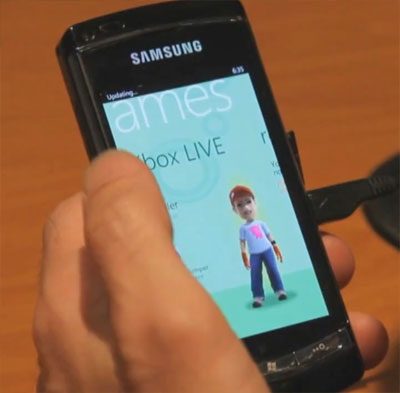
Everything. Microsoft has started completely fresh with the design for Windows Phone 7, so old users won’t even recognize the new interface, which now uses a system of tiles and hubs. Other major additions include voice recognition, integrated Xbox Live functionality, and multi-touch support.

How has the interface changed?

The old interface, was was originally developed for stylus input, has been replaced with a finger-friendly system of “tiles,” which represent functions like messaging, Facebook or Internet Explorer. They’re really just smaller icons within a system of six hubs, like Photos, Office and Games. Much of the navigation between them takes place with up-down swides and side-to-side panning from screen to screen.

The visual style has also changed with an emphasis on minimal clutter. Zune HD owners will immediately feel familiar with everything from the wiry sans serif fonts to the grid-like graphics and black background.

Will it run old Windows Mobile software?

Unfortunately, no. Due to the “fresh start” approach, code written for different versions of Windows Mobile won’t work on Windows Phone 7, so all your favorite apps will need to be rewritten.

What about an app store?

Microsoft has wisely decided to go with an app store, dubbed the App Marketplace, so you’ll be able to download new programs directly to your phone the same way you would on iOS, Android or webOS. Of course, all these platforms also have a huge head start on Microsoft.

Will Microsoft produce its own Windows Phone?

No. Although Microsoft produces the Zune HD – a very close relative of Windows Phone 7, Microsoft has no plans to scrape together a phone of its own. The usual alliance of Microsoft partners, including Samsung, LG and Asus will produce the actual hardware.

Microsoft has, however, ratcheted down new restrictions on its partners, which will likely keep the first crop of phones to a more consistent quality than the scatter-shot selection of hardware we remember (not so fondly) from Windows Mobile.

What kind of hardware will it come on?

As noted above, Microsoft has imposed some severe restrictions on OEMs to ensure Windows Phone 7 doesn’t end up on hardware that simply can’t deliver the full experience. According to Microsoft, every Windows Phone 7 device will require:

  • Capacitive touch screen with 4 or more contact points
  • A-GPS, accelerometer, light and proximity sensors
  • 5-megapixel or better camera with flash and hard shutter button
  • Codec acceleration for multimedia
  • 256MB or more of RAM, 8GB or more of flash memory
  • GPU with DirectX 9 acceleration
  • ARM v7 Cortex, Scorpion or better CPU
  • FM radio tuner
  • Dedicated back, start, search, camera and power buttons

Will it multitask?

Amazingly enough, no. Microsoft has already come out and admitted that Windows Phone 7 will not run multiple applications at once, as part of its emphasis on simplicity. A process internally dubbed “tombstoning” will save your state in an application so you can return to it without losing your place, but processes won’t run in the background. Considering webOS, Android and even iOS now support multi-tasking, this will put Windows Phone 7 at an immediate disadvantage.

What else is a missing?

Based solely on first impressions, the only other notable missing feature will be copy and paste, which Microsoft has apparently left out for the sake of simplicity, just like multitasking. Some hints from Microsoft developers seem to suggest that both features have already been planned as upgrades later on, after smoothing out the initial kinks.

Will it support Flash, Silverlight or HTML5?

The technical preview distributed to developers and journalists lacked all three platforms, but Adobe has already pledged it will work to develop a version of Flash for the production version, and Microsoft will naturally provide Silverlight support as well. However, because the browser is based on Internet Explorer 7, it looks like HTML5 will be a no go. That will certainly put it (even more) at odds with the Apple camp, where Steve Jobs has pulled the opposite approach by barring Flash and embracing HTML5.

When will it become available?

Microsoft still hasn’t announced any firm release dates, but it October and September both seem likely candidates for the first assault of Windows Phone 7 devices.

Tuesday, July 20, 2010

The Music Industry's Going Through Some Changes

"The music business historically has been built around albums. This album-centrism is like saying the sun revolves around the Earth. We don't listen to albums now; we listen to collections of songs."

"More people are engaged with music than ever before," said Tom Silverman, chairman and CEO of Tommy Boy Records. "It's a hockey stick going up; it's an incredible opportunity that so far has eluded us." Silverman was speaking this morning at the New Music Seminar in New York City, where he and Eric Garland, CEO of Big Champagne (who also unveiled the Ultimate Chart today), gave a State of the Music Industry address. Even if you aren't a player in the industry and only an avid music listener, the figures that Silverman and Garland culled will surely surprise you. Here are a few of their key findings.

A shift from albums to singles

Of the some 100,000 albums released last year, 17,000 of them sold only 1 copy; more than 81,000 albums sold under 100 copies. In fact, just 1,300 albums sold over 10,000 copies, an astonishing figure given that these numbers combine physical and digital album sales. And for physical sales alone? Only 2% of new albums on Soundscan sold over 5,000 copies—that's a skydiver's plummet from the golden era of the music industry.

The State of Internet Music on YouTube, Pandora, iTunes, and Facebook

"The music business historically has been built around albums," explained Silverman. "This album-centrism is like saying the sun revolves around the Earth. We don't listen to albums now; we listen to collections of songs."

Of course, the reason for significant single-growth and slowed-album sales is due in part to iTunes hawking every song as a single for 99 cents. "Historically, the price of an album was five times greater than a single," said Silverman, who believes setting the price at a tenth of an album's cost was a mistake and that even $1.29 is too low. "It should've been a $1.99, and then we would've seen higher digital album sales because it would've been a bigger discount for buying an album." But both Silverman and Garland agreed that this is changing, citing the fact that about 14% of all of Universal Music's digital sales are for complete albums, which suggests that the $9.99 price-tag is becoming approachable for consumers.

Facebook, Myspace, and Twitter: Track your FFF number

According to Garland, industry folks today are obsessed with "FFF numbers"—that is, an artist's friends, fans, and followers. "It's a race, but to what end?" he wondered. Garland showed through a series of charts how Twitter and especially Facebook are ballooning in popularity for artists like Lady Gaga, while once popular Myspace's numbers are stymied.

However, Garland points out that Facebook recently forced most users into converting their profile favorites into "fan" data, which arbitrarily inflated the social network's numbers. For example, Garland tells the story of how when Susan Boyle's performance first blew up, a friend of his added the YouTube star to his Facebook profile. When Facebook imported this data though, he instantly became a "fan" of Susan Boyle. "[He] had no interest in it—[he] liked her for like 30 seconds, once!" Garland relates. "It doesn't really indicate any consumer activity—it's automated," added Silverman.

Garland's story serves as an indicator of just how difficult it is to figure out the influence of an artist through his or her FFF number. After all, even if Lady Gaga starts losing friends on Myspace, that's less of an indication of her popularity, and more a sign of Myspace's falling use.

Google and YouTube more important than iTunes?

Interestingly, it wasn't Apple that Garland viewed as the most important name in music, even though the company's iPods, iPhones, and iTunes indicate otherwise. "YouTube is increasingly the category killer," argued Garland. "When people ask me what is the biggest name in music in my opinion, they want me to say Apple. I usually answer: YouTube."

Garland told audiences that if you actually look to where people are listening to music—not even just looking at videos—consumers are turning more and more to YouTube, which he calls the "largest catalog of on-demand music on the Internet." If only Google could make this service profitable, right?

Internet radio: Pandora

Garland and Silverman pointed out that Pandora is now the most popular Internet radio service, with a 52% market share, close to 60 million registered users, and more than 1 billion stations.

And in a sign of just how much the Web has impacted music, Silverman told the crowd that Pandora now represents 1.7% of all radio listening—really a shocking figure to think about. Obviously, traditional music media is going away. But is the music industry ready for the change?

Sunday, July 18, 2010

Installing Ubuntu on a Mac

I've heard many requests on how to do this. Here goes:

Ubuntu is a build of Linux that is easier for users to grasp. I've found this version to be a lot better than SuSE 8.1. Ubuntu is GNOME based so if you like Gnome you like this version, but if you like KDE, then I suggest you download Kubuntu. You can download either of these, including a Live CD, from http://www.ubuntulinux.org or http://www.kubuntu.org for Gnome and KDE, respectively.

STEP 1: Obtain the installation medium |
You can download a Live CD to see what Ubuntu will be like or an install CD to install it. NOTE: Live CD's are a lot slower since they keep loading things off of the CD.
After you've downloaded it. Burn the image onto a CD using your favorite app. I recommend Disk Utility or Roxio's Toast.

STEP 2: Installing UBUNTU
After you've burned it, keep the CD it and reboot and hold the C key down to boot from the CD. When it load, keep the defaults and hit enter. Choose your language, hit enter. It'll ask you how you want to partition your hard drive. If you know these settings set them. Otherwise just wipe out the entire hard drive and whatever's left you'll have for free space. The next thing it'll prompt you for a bit is your first user and your password. NOTE: The password does not show up, so don't freak out if you start typing characters and nothing appears. Just type in your password and hit enter, verify it, hit enter. The installation will continue installing stuff and finally reboot. When it reboots it'll setup everything. Don't hold down the C key to boot from the CD, just let the setting up continue.

STEP 3: After setup
When you get to the Window where you can type in your login stuff, go ahead and type it in and login. The first thing you want to do is setup you network settings. Click System go to Administration->Networking. Configure your eth0 device as you need. If you use DHCP, you don't need to do this. If you run under a proxy do this step next. Go to System->Preferences->Network Proxy. Set your settings in there. I suggest, if you have fast internet, to upgrade what you can. Click Applications then Run (at the top). Type in xterm Xterm is easier for me to use cause I've used it a lot. Its a terminal.
FOR PROXY USERS: Type in this: export http_proxy=http://the_proxy_ip_address:your_port_number/
Most of the time it'll be 8080, but you've configured it how you've done it.
FOR OTHERS: You just skip that step. Now type in: sudo apt-get update
then: sudo apt-get upgrade
Finally so you can get more stuff cd down to /etc/apt type in sudo cp sources.list.orig
then: sudo pico sources.list
remove the # from lines that start with deb or deb-src and have http://some site and stuff
Press CTRL+O to save it. then CTRL+X to quit.
You can now do: sudo apt-get update
again to get a full list of packages so you can install them. Congrats. You have a powerful, yet friendly OS. Under System->Administration is Synaptic Package Manager you can install a lot of upgrades. Refer to http://ubuntuguide.org for more information. And be sure to check out http://www.ubuntuforums.org/

Have fun with Ubuntu - Default apps include:
OpenOffice 1.1.5
GIMP
Firefox - Configure for PROXY if you need to
GAIM - Configure for PROXY if you need to
Evolution - Configure for PROXY if you need to
and a whole heck of a lot more

XBox360 250GB review

The new XBox 360 is out, head over to Engadget for the official review!

http://www.engadget.com/2010/07/02/new-xbox-360-slim-250gb-review/

Saturday, July 17, 2010

Upcoming Smartphones


Motorola Milestone XT720


Motorola has confirmed the availability of the Milestone XT720 in the UK market. This handset will be launched in the UK on July 19th, 2010. Priced at £381.88 ($), this Android smartphone features a 3.7-inch (480 x 854) capacitive multi-touch screen, an 8MP camera with AutoFocus and Xenon flash, an ARM Cortex A8 720MHz processor, a 512MB of RAM, a 512MB of ROM, a 150MB available internal memory expandable via a microSD card slot (8GB card included in retail package). Additional specs include a 3.5mm audio jack, Wi-Fi 802.11 b/g, Bluetooth 2.1 with A2DP and a 1390mAh battery. The phone measures 116mm x 60.9mm x 10.9mm and weights 160 grams.


Nokia C6-01


Nokia has unveiled the new Nokia C6-01 that features an 8MP digital camera with dual LED flash instead of a single LED flash. Priced at €279 or around $360, this camera phone has recently appeared at Nokia Netherlands’ official website. The Nokia C6-01 features a QWERTY keyboard, a 360 x 640 pixels touchscreen display, Wi-Fi, GPS and Ovi Maps with free navigation etc.


Pantech SKY IM-A650S Vega Android Smartphone


Pantech has announced a new Android smartphone for the South Korean market namely the SKY IM-A650S Vega. Powered by a 1GHz Qualcomm Snapdragon processor, the handset boasts a 3.7-inch 480 x 800 AMOLED touchscreen display, a 5-megapixel camera, a 500MB of internal memory, a microSD/SDHC card slot (8GB included), T-DMB, a media player, 720p HD video recording, GPS, WiFi, Bluetooth, a 3.5mm headset jack and runs on Android 2.1 OS. The Pantech SKY IM-A650S Vega will be available via SK Telecom for announced price yet.


Apple iPad Review

When I did my First Look article about Apple's new iPad after its official announcement, I qualified the numerous gripes I had about the device with the iPad's promising potential to shape up into a very solid multimedia device.

Having spent an extended amount of time tinkering with the iPad following its launch, I find it interesting that I pretty much still feel the same way.

Still, there's no doubt that Apple's new slate tablet hits some key features straight out of the park.

Does this all add up to a "magical" and "revolutionary" experience? Read on for my review of the 16GB Apple iPad WiFi tablet.

PROS

It's a looker: For a device that features a pretty simple design, it's interesting how many "oohs" the iPad generates when shown to people. The iPad's minimalistic design takes a less-is-more approach, with a single home button on its face and just a few more on the edges for volume, screen orientation locking and power/sleep.

I admit that I thought the black screen bezel or border looked a bit big at first. But after spending plenty of time with the device, I think it strikes the right balance between showing enough screen real estate and making sure users don't inadvertently hit the touch screen.

Speaking of the screen, the 9.7-inch LED display looks nice and sharp indoors and is still surprisingly readable when taken outdoors on a sunny day. The rounded back also makes the device comfortable to hold, with the brushed aluminum making the iPad look much classier than, say, cheap-looking plastic.

Easy to use: The iPad doesn't come with a bulky manual and for good reason. I handed the device with no instructions to one of my not-so-tech savvy aunts and found her posting on Facebook and downloading eBooks a few minutes later.

Set up is quite easy and simply requires hooking the device to a computer with the latest version of iTunes. The interface is quite user-friendly, featuring simple tapping, swiping, pinch-to-zoom and auto screen rotation. The touchscreen keyboard also works a lot better than I expected.

It might take time for folks used to a Windows interface to get used to navigating through files, especially when there's a ton to sift through. But Apple did a good job overall on the iPad interface, including little touches like making eBook pages bend like real paper when you swipe to turn them.

Excellent battery life: As someone who has used many wireless-enabled gadgets, I'm used to Wi-Fi quickly sucking the life out of my portable devices. I'm also used to manufacturers padding their battery life claims. So imagine my surprise when the iPad I tested was still humming along after 10 hours of use. For folks who plan to frequently take their iPad on the go, that's definitely a plus.

Speedy performance: Impatient folks will love how quickly the iPad does tasks. Opening apps is lightning fast, for example, while scrolling through photos is pretty much instantaneous. Downloading apps is also quick — good news for folks who like wading through Apple's app store. Speaking of apps...

There really is an app for that: You get apps like Maps, YouTube, iTunes, Mail and Safari right off the bat. Social networking addicts, er, lovers can also download Facebook and Skype for free. With the ability to run almost all of the Apple App Store's more than 150,000 apps — including more than 1,000 new ones made for the iPad — you can pass (or waste) countless hours just looking for apps to fiddle with.

Price: Given how overpriced some eReaders are, the iPad's entry price of $499 looks pretty attractive for folks who want a reader that can do much more than just read eBooks.

CONS

No Flash support: While browsing through Facebook with the iPad, my uncle excitedly clicked on a video of his little son overseas and it wouldn't play. Needless to say, he was bummed. Say what you will about Flash's drawbacks, but it's still a key part of the complete Web experience that Apple says its iPad is supposed to deliver. Even netbooks (gasp) at least let consumers play Flash video and games if they want to.

No real multitasking: Yes, you can listen to music via the iPod app while using Facebook. But if you want to use Facebook, Twitter and Skype, you better use them one at a time. That's because using multiple apps typically means switching between those multiple apps. On the plus side, the iPad switches between apps pretty quickly. But for serious multitaskers, it pretty much equates to a hit on productivity.

*Edit: Apple has announced that it will have multitasking for 3rd-party apps on the iPad by Fall 2010.

No camera, standard slots: Even if taking pictures with an iPad doesn't exactly seem natural, it would at least be nice to have a camera to use for video chatting with Skype. No SD Card and USB slot also means fewer options as far as external memory or add-ons. Having an HDMI slot would at least be nice so you don't have to fork more extra dough to buy Apple's official connectors to link your iPad to an HDTV.

A bit hefty: Although the iPad is comfortable to hold and has a nice solid feel, it does start to feel heavy after a while. This especially becomes an issue when you're holding the device with one hand and entering text with the other.

CLOSING THOUGHTS

I'd be lying if I said I didn't like the iPad. There's just something about its interface, its features and how the whole thing is put together that makes the device feel polished and fun to use.

At the same time, it also seems unfinished. It certainly has potential. But potential is only good, of course, if you fulfill it.

Maybe the fact that I'm a tech lover makes me a bit more demanding. Maybe Apple's track record for innovative products ratcheted up my expectations too high. I actually let three relatives play with the device — the aforementioned aunt and two cousins in middle school — and they just loved it. That right there, is the reason for Apple's success. More often than not, the company knows how to make devices that the typical consumer loves.

Just based on the reactions of typical consumers I've shown the device to (and I showed it to a LOT of people), there's no question the device has the "it" factor. And while I still can't give Apple a pass for the iPad's lack of certain features, I also think the company deserves credit for coming up with a solid device that brings new life to the once-tepid slate tablet market.

It's still not quite the laptop replacement for people who need to do a lot of work on the go. But for consumers who simply want a no-nonsense portable entertainment device that lets them surf the Web, read eBooks, listen to music, watch videos and use apps, the iPad is certainly worthy of consideration.